AUTOMATED BROKEN LINK CRAWLER
Automatically crawl your website to detect broken links, 404 errors, and other HTTP issues. Keep your site healthy and maintain a great user experience.
TL;DR: SecurityBot's Broken Link Checker automatically crawls your website weekly to detect 404 errors, broken links, and dead pages. Scan up to 2,000 pages per crawl, get detailed reports showing exactly where broken links appear, and export to CSV. No manual work required — set it up once and get notified when links break.
START FREE TRIAL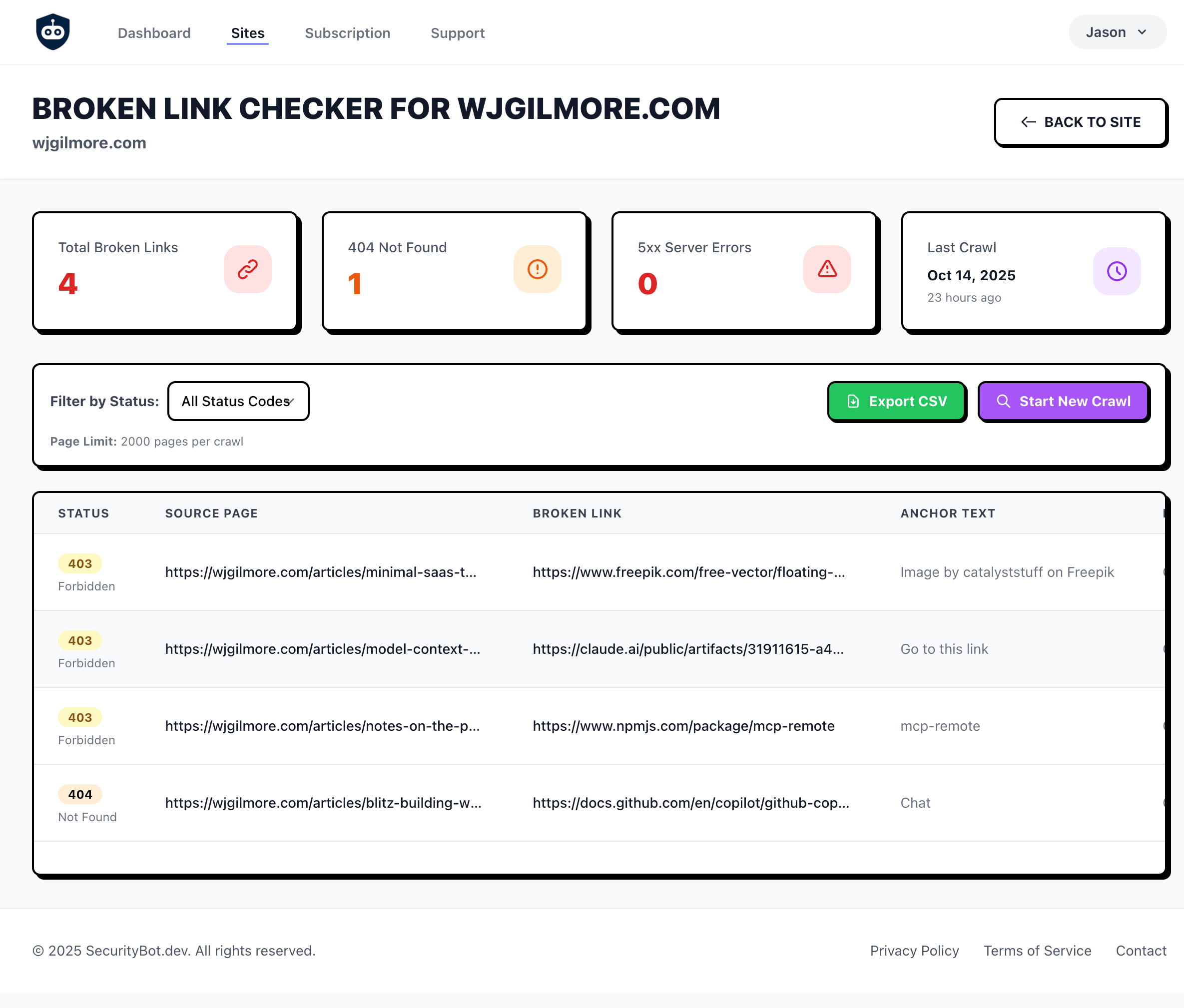
POWERFUL LINK MONITORING
Everything you need to keep your site's links healthy
Automated Weekly Crawls
SecurityBot automatically crawls your site every week to detect broken links. Set it and forget it.
On-Demand Crawls
Trigger manual crawls at any time. Perfect for after deployments or content updates.
Detailed Reports
See exactly where broken links are, what pages they're on, and export to CSV for easy tracking.
Multiple Status Codes
Detect 404 Not Found, 403 Forbidden, 500 Server Errors, and more. Filter by status code.
Configurable Crawler
Customize user agent and crawl delay to avoid rate limits and WAF blocks.
Large Site Support
Crawl up to 2,000 pages per scan. Perfect for content-heavy sites and blogs.
EASY CONFIGURATION
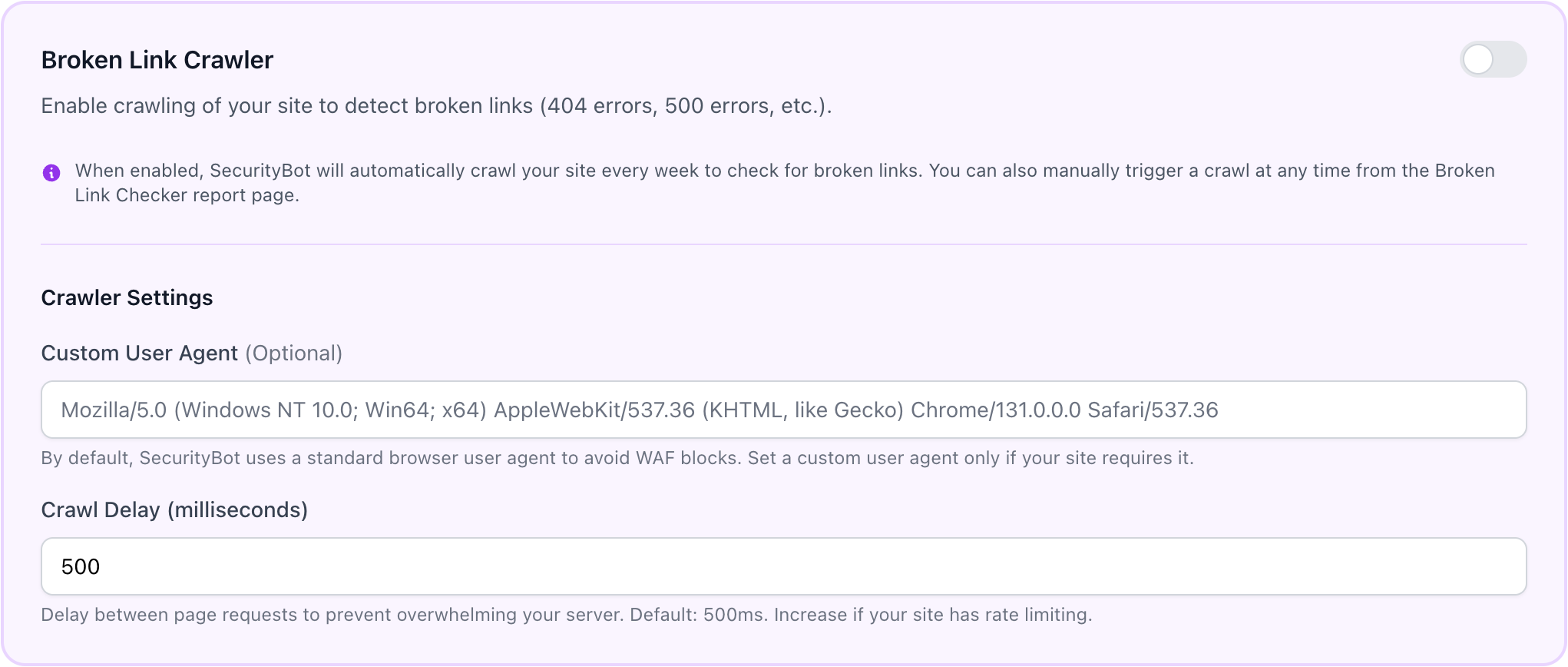
Configure the broken link crawler to work perfectly with your site. Set custom user agents to avoid WAF blocks, adjust crawl delays to prevent overwhelming your server, and enable/disable automated weekly scans with a simple toggle.
-
Custom User Agent
Set a standard browser user agent to avoid WAF blocks on popular sites
-
Configurable Crawl Delay
Prevent overwhelming your server or triggering rate limits
-
One-Click Toggle
Enable or disable automated weekly crawls with a simple toggle switch
HOW IT WORKS
Get started in minutes
Enable the Crawler
Go to your site's settings and toggle on the Broken Link Checker. Optionally configure crawler settings.
Run Your First Crawl
Manually trigger a crawl from the Broken Link Checker page to get immediate results.
Review & Fix
See all broken links in a detailed report. Export to CSV and fix issues to improve your site.
WHO SHOULD USE A BROKEN LINK CHECKER?
Built for people who care about their site but don't have time to check every link manually
Indie Hackers & Solo Founders
You don't have time to manually check every link on your site. Automated weekly scans catch problems before your users (or Google) do.
Content-Heavy Blogs
The more content you have, the more links can break. Old posts linking to defunct resources, deleted internal pages, and URL changes all create broken links over time.
Ecommerce Sites
Product pages come and go. Category structures change. Without monitoring, broken links accumulate quickly and hurt both SEO and customer experience.
Agencies Managing Client Sites
One dashboard to monitor broken links across multiple client websites. Export CSV reports to share with clients and demonstrate value.
WHY CHOOSE SECURITYBOT'S BROKEN LINK CHECKER?
Unlike standalone link checkers, SecurityBot includes broken link monitoring as part of comprehensive website monitoring — all for $5/month
| Feature | SecurityBot | Standalone Tools |
|---|---|---|
| Broken Link Checker | ✓ | ✓ |
| SSL Monitoring | ✓ | ✗ |
| Uptime Monitoring | ✓ | ✗ |
| Security Headers | ✓ | ✗ |
| Domain Expiration | ✓ | ✗ |
| Price | $5/month | $10-50/month |
All-in-one website security monitoring for indie hackers
View Pricing →FREQUENTLY ASKED QUESTIONS
Everything you need to know about the Broken Link Checker
What is a broken link checker?
A broken link checker is a tool that automatically crawls your website to identify links that return HTTP error codes like 404 Not Found, 403 Forbidden, or 500 Server Errors. SecurityBot's broken link checker can scan up to 2,000 pages per crawl and provides detailed reports showing exactly where broken links are located on your site.
How often does the broken link checker run?
SecurityBot automatically crawls your site every week to check for broken links. You can also trigger manual crawls at any time, which is particularly useful after deployments or content updates.
Can I configure the crawler settings?
Yes! You can customize the user agent to avoid WAF blocks and adjust the crawl delay (in milliseconds) to prevent overwhelming your server or triggering rate limits. These settings are configurable from your site's settings page.
What types of errors does it detect?
The broken link checker detects multiple HTTP status codes including 404 Not Found, 403 Forbidden, 400 Bad Request, 500 Server Errors, and more. You can filter the results by status code to focus on specific types of issues.
Why are broken links bad for SEO?
Broken links negatively impact user experience and can harm your search engine rankings. Search engines like Google view broken links as a sign of poor site maintenance, which can lower your site's authority and ranking. They also prevent search engine crawlers from properly indexing your content and waste your crawl budget.
Can I export the broken link reports?
Absolutely! Every report includes an "Export CSV" button that allows you to download all broken links in a CSV format. This makes it easy to share the report with your team or track fixes over time.
Do broken links affect SEO?
Yes, broken links negatively impact SEO in several ways. They waste your crawl budget as search engines attempt to access non-existent pages. They disrupt internal link equity, preventing PageRank from flowing to connected pages. They increase bounce rates when users hit dead ends. And they signal poor site maintenance to search engines, which can lower your site's perceived authority. While Google won't directly penalize you for a few 404 errors, accumulated broken links create compounding SEO problems. Regular monitoring with an automated broken link checker helps you catch and fix issues before they hurt your rankings. Learn more about how broken links affect SEO.
How do I crawl my site for broken links?
You can crawl your site for broken links using SecurityBot's automated crawler. Simply add your website, enable the Broken Link Checker from your site settings, and run your first scan. SecurityBot will crawl up to 2,000 pages, following every link to detect 404 Not Found, 403 Forbidden, 500 Server Errors, and other HTTP issues. Results show the exact page where each broken link appears, making fixes easy. You can also enable automated weekly crawls so broken links are detected continuously without any manual effort. Read our full crawling guide.
What's the difference between internal and external broken links?
Internal broken links are links within your website that point to pages on your own site that no longer exist. These have higher SEO impact because they disrupt your site structure and waste crawl budget. External broken links are links on your site that point to other websites that have moved or disappeared. While these have less direct SEO impact, they hurt user experience and make your content appear outdated. SecurityBot's Broken Link Checker detects both types and shows you exactly where each broken link is located.
How often should I check for broken links?
For most websites, weekly automated scans are sufficient to catch broken links before they cause problems. However, you should run additional manual scans after deploying code changes that might affect URLs, publishing or deleting large amounts of content, migrating to a new domain or URL structure, or making significant changes to your site architecture. SecurityBot handles weekly scans automatically and lets you trigger on-demand scans anytime from your dashboard.
Can broken links hurt my Google rankings?
Broken links don't trigger a direct Google penalty, but they create indirect ranking problems. When Googlebot encounters many broken links, it may crawl your site less efficiently, potentially missing important pages. Broken internal links prevent link equity from flowing to your pages, weakening their authority. Users who encounter broken links often leave immediately, increasing bounce rates — a signal Google uses to evaluate content quality. For these reasons, maintaining a healthy link structure with minimal broken links is considered an SEO best practice. Read our complete guide on broken links and SEO.
LEARN MORE ABOUT BROKEN LINKS
Deep-dive guides to help you understand and fix broken link issues
Do Broken Links Affect SEO?
How broken links impact crawl budget, link equity, and rankings
How to Crawl Your Site for Broken Links
Step-by-step guide using free tools and dedicated crawlers
Best Automated Link Checker Tools
Comparison of top broken link checker tools in 2026
How to Find and Fix Broken Links
Practical guide with prioritization framework and prevention strategies
Broken Backlinks: Recover Lost Link Equity
Find and recover SEO value from external links pointing to your 404 pages
READY TO FIX YOUR BROKEN LINKS?
Start your Pro account today and get access to the Broken Link Checker plus all other Pro features.
START FREE TRIAL